If you liked this, Pin to Pinterest, or save for later.
My Therapist Website Checklist.
My checklist resource guides you, in about 10 mins or so, for making sure that people who hop on your site, can clearly understand the basics.
To give you an idea, the basics would include: who you help, building trust by showing your qualifications and professional credentials, sharing your fees without people having to dig around and knowing what to expect after they get in touch with you.
So, grab yourself a cuppa and work through the 10 points below. If you’d prefer a printable version of my freebie therapist website checklist, grab that just below. I’d suggest you plug any gaps in the order I’ve given. I’ve also added UK bits and bobs that can get forgotten like memberships, certifications, privacy terms and accessibility.
In this blog post, we'll cover:
A 10 minute way to test your homepage
The 10-point therapist website checklist
What I'd focus on first, and why
Keeping your directory listing and website consistent
A real example from a hypnotherapist's website
DIY, or get help?
How To Run The Ten-Minute Check
I like to think of your homepage as your kitchen: it’s the hub of your home, and people like to know where they are and where to go next without having to search around for a light switch in the dark.
Open your homepage on your phone or desktop.
Set a timer for 10 mins.
Go through my 10 points below and check off each one yes, partly or no.
Count "partly" as a no. If you're not sure, a nervous visitor won't be either.
Fix the gaps in the order in "What I'd fix first".
I often find websites in the ‘helping’ industry have too much information on their homepage, and when people can’t see the wood for the trees, they often give up before they’ve even got started. The homepage is all about the essentials, then the remaining pages can address everything else.
The Therapist Website Checklist: 10 Things To Check
1. Say who you help, using clear words
People tend to search based on the problem on their mind, not the specific name of your training. For your private practice website, have a think and name the issues of the clients you work with, and say whether you tend to see clients online, in person or both. This typically belongs near the top of your homepage.
The check: after five seconds, can a person who has never visited your site, say who you help?
2. Show credentials and registration, accurate and current (often forgotten)
It’s helpful to share the name of your professional body and link to your entry on its register (if it has one). Make sure your membership hasn’t lapsed, and follow the membership rules on using its logo. If you’ve embedded code with your membership details, make sure it’s up to date, as this was something I came across with a client. The Advertising Standards Authority ASA upheld a complaint against a psychotherapist in 2021 because the website claimed they were a British Association for Counselling and Psychotherapy BACP member when the BACP said they weren’t, and that they hadn’t realised the membership had lapsed. As you’ll already be aware, this applies to any membership or accreditation claim for psychotherapists, counsellors and other registered practitioners.
Useful link: ASA UK (Advertising Standards Authority).
The check: does every claim still match your register entry today?
3. Use a real, warm photo, and one of your space
As a minimum, include one warm, clear headshot of you in natural daylight. This does so much more than a stock image, ever could. Then, a photo of the room or entrance helps people know what to expect. Don’t forget to add alt text to these photos (a short description of the image for screen readers and search engines).
The check: is there a photo of you on the homepage, with alt text?
4. Put fees and practicalities in one place
Do you include an intro call? Make sure your fees with session lengths are clearly visible, along with reduced-fee slots (if offered). If you leave out pricing, make sure it’s easy for someone to find out eg. PDF download, without having to fill out a contact form or phone you (fewer clicks the better).
It’s also super handy for clients when you share your location, ideally with a Google Map embedded directly into your Squarespace site.
The check: can someone find your fee in less than two clicks?
5. Say what happens after someone enquires (often forgotten)
People like to know where they stand, so let people know when you’ll reply. For clients, I like to include this info immediately above or below a contact form, and then repeat the same info when they submit an enquiry. That way, they’re not left guessing.
Other useful questions to answer. What happens on the intro call? What can they expect in a first session? All of this info is for helping someone understand what they’re agreeing to, and to create a comfortable experience from the beginning.
The check: does your contact page say what happens next?
6. Make it gentle and easy to enquire
Include a short contact form, and a telephone number (if needed). Don’t crowd the form with too many questions and jargon. I’d definitely recommend using a scheduling tool for booking appointments. If a client is ready to book, you want to have a robust system in place and to know that it’s fully reliable.
Let the client choose an appointment date and time with a payment processor enabled, or at least the capability to book their spot and then pay on arrival. Acuity is a great scheduler, along with cal.com*, etc. Don’t forget to include your cancellation terms.
My forms guide and CTA buttons post can also help.
The check: can you enquire in under a minute, on your phone?
7. Explain how you work, in plain English
Think about the words you use. Words like “integrative” or “CBT” can mean little to someone who’s never had therapy. Explain in simple words using a sentence or two.
The check: could a friend outside the profession explain what you do?
8. Say who you're not for, and where to get urgent help (often forgotten)
Sharing a calm line saying that you’re not an emergency service, with a link to a website such as the Samaritans or the NHS could be helpful (take wording guidance from your professional body).
The check: is there a clear signpost for someone in crisis?
9. Cover legal pages: privacy, cookies and enquiry forms (often forgotten)
When you have a site that uses cookies, or you collect personal details by having a form, UK data protection laws mean you must have a privacy policy.
My privacy policy post explains the Squarespace side. I personally use and recommend Termageddon*. There’s also the ICO. I'm not a solicitor, so check your own obligations.
Useful link: UK GDPR guidance and resources via ICO.
The check: does your enquiry form link to your privacy information?
10. Keep it accessible, calm and mobile-friendly (often forgotten)
Make sure that your text is readable ie. don’t use a ‘fancy’ font with swirls or italics, and make sure it’s a readable text size. Don’t forget to include alt text on images, use text hierarchy for headings and paragraphs.
My colour contrast guide and free checklist walk you through it.
The check: can you read it on your phone in bright light?
What I'd Fix First
Credentials (point 2). It's about honesty and building trust, and if left unclear, people may leave your site and you’d be none the wiser.
What happens after someone enquires (point 5). It's where nervous visitors leave.
Privacy (point 9). A form without privacy information is a quiet risk, and can make you look unprofessional.
Then plain words about who you help (1), an easy enquiry route (6), and the rest.
Already have a site and want a second pair of eyes? A Professional Website Audit with Strategy is £698, fixed.
Keep Your Directory Listing and Website Telling The Same Story
If you're on a directory, treat it and your website as one story; be consistent. Use the same membership claims, fees, availability and photo in both, and link your listing to your site. It's less to update, and nothing contradicts anything else. BACP says more than 17,000 members use its Therapist Directory, so your listing is one of many, and your own site is where you control the detail.
A Real Example: A Hypnotherapist's Website
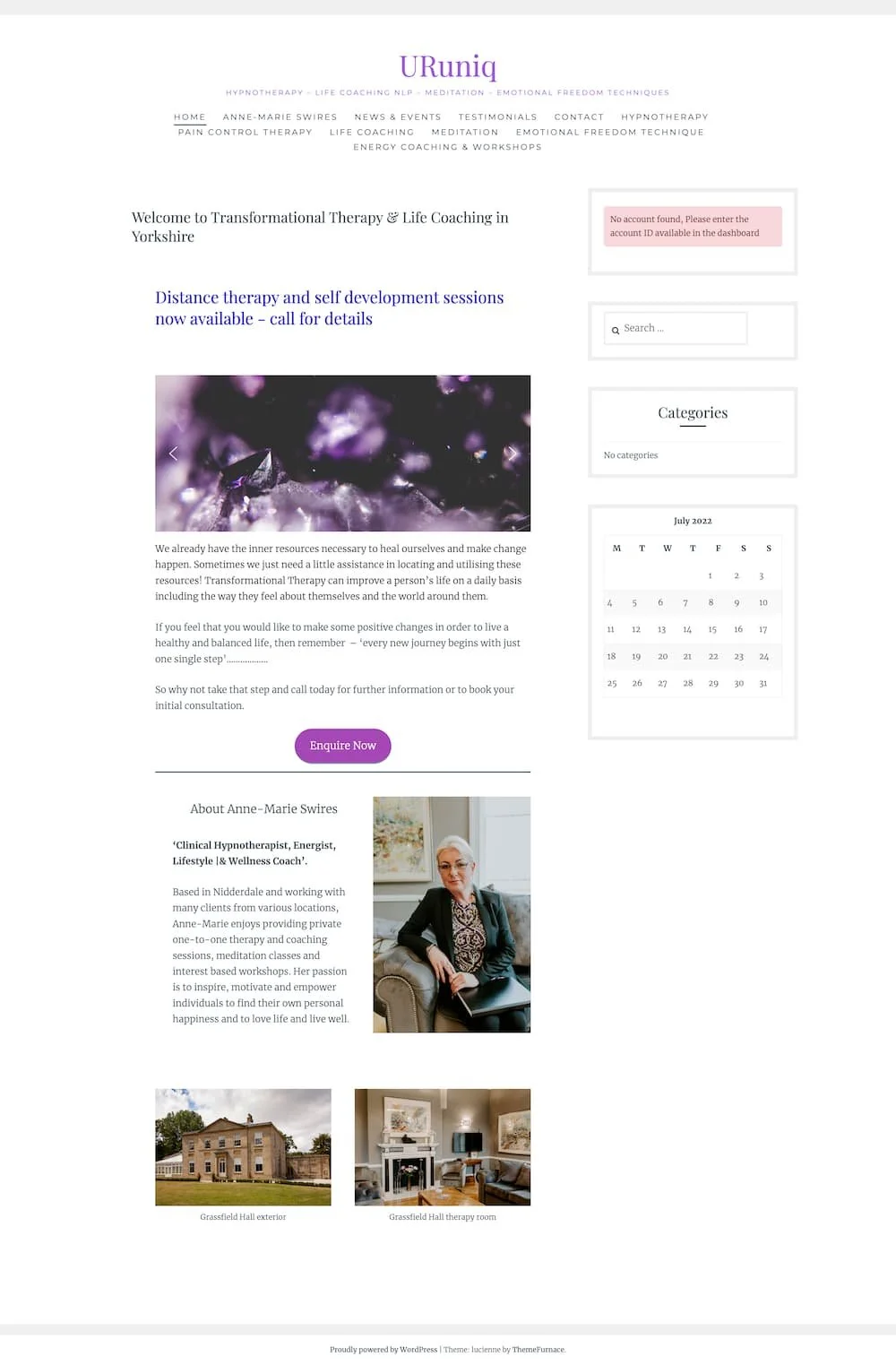
Before: old website

After: Hypnotherapist practice website
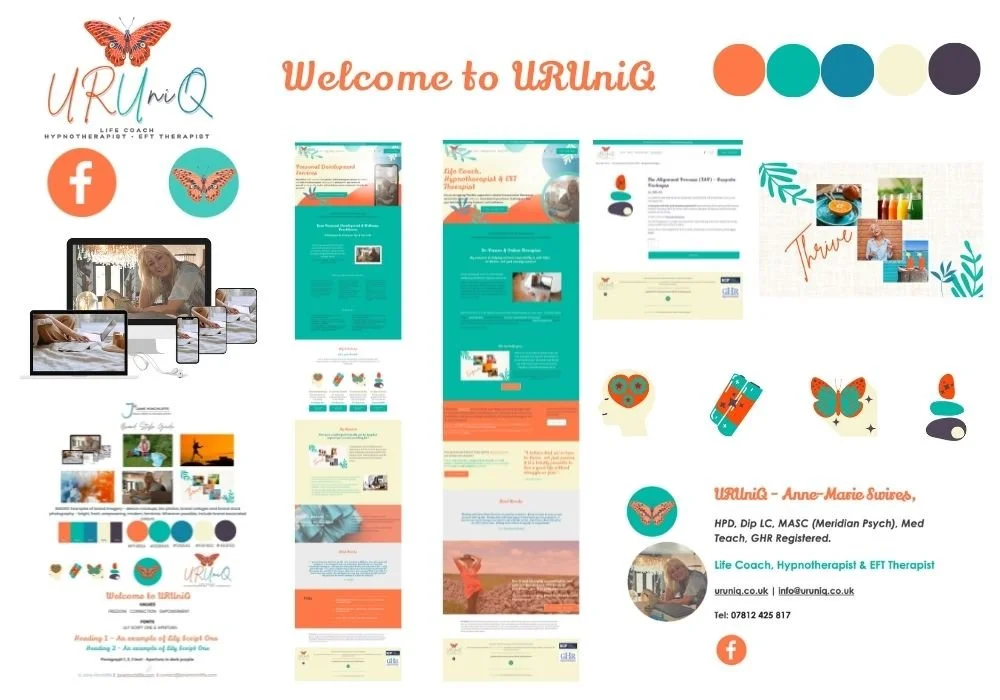
Brand identity for Hypnotherapy practice
What she needed: her site was muddled and too wordy
One decision I'd repeat: clear sections to break up information
What changed: everything, including less clutter and images to match her brand personality
From a site that had previously looked dated and muddled, she came away with a site that spoke to the people she wanted to work with (she received positive feedback from present clients), made it easy for people to enquire, with a visual identity to match her personality.
DIY, or Get Help?
Building your website yourself is great if you have the time and skills to enjoy it, and the checklist above will get you most of the way for what to include. However, if you’ve been putting it off, or you’d rather spend those precious hours with clients, help makes sense. If you’re starting from scratch, my 3-Day Quickstart is fixed at £2,495 (up to 5 pages, with your content ready). For a fully bespoke build, Custom projects start from £3,500.
Related: take a look at my Squarespace websites for therapists page, or my DIY versus professional post.
Therapist Website FAQs
-
It needs to show who you help, your credentials and registration, your fees and practicalities, what happens after someone enquires, an easy way to get in touch with you, and privacy and accessibility basics. Use the checklist above to check each one in about ten minutes.
-
Not always, but it definitely helps with credibility and professionalism. A website lets you keep your information consistent, explain things in your own words and show privacy information. It’s also an opportunity for sharing other helpful information like a blog or additional resources. If you have both, make sure they tell the same story and link to each other.
-
If your site collects personal information through a form or uses cookies, UK data protection law means you must provide privacy information. I'm not a solicitor, so check your own obligations.
-
Check first. Your professional body and the advertising rules may have views on this, and you'd need permission. I can't advise on what's allowed, so ask your body before you add any.
-
Squarespace charges a subscription, and a web designer's fee is on top.
Then it depends whether you hire someone or build it yourself. My 3-Day Quickstart is a fixed £2,495 for up to 5 pages when you supply the content, and Custom projects start from £3,500.
-
You would start with readable text and strong colour contrast on buttons and backgrounds, add alt text to images, use headings in order and avoid autoplaying video. Then test on your phone. My colour contrast guide and free checklist walk you through it.
Key Takeaway
Generally, most of what gets forgotten is small and totally fixable. I’d start by thinking how you want people to feel when they land on your site. Then, I’d fix the first three points, then work down the list. Download the printable checklist above, or if you'd like a hand, book a relaxed chat. ☕
AFFILIATE DISCLOSURE *
I only share affiliate links which I genuinely use and/or recommend to my clients; small compensation possible if you click through and purchase, at no extra cost to you.




Join the HeartBiz Newsletter
Recent Blog Posts