Why Squarespace Website Maintenance Really Matters
If you liked this, Pin to Pinterest, or save for later.
Your Squarespace website launched beautifully. You felt absolutely chuffed to bits. But launching your site isn't the finish line; it's just the start.
If you've been treating your website like a "set it and forget it" appliance, you're not alone. But you might be leaving money on the table. Over 61% of businesses now use third-party website maintenance services, and there's a blooming good reason why.
In this blog post, we'll cover:
Why Squarespace website maintenance is essential
What happens when you skip it
The practical steps you can take to keep your site working beautifully for your business
I'll share how my VIP Website Maintenance Day can solve months of website headaches in just one focused session
Plus, get my free Notion Small Business Web Maintenance Tracker (sign up below)
Want help with maintenance? Click here 👉 VIP Squarespace Website Maintenance Service
All In One Place - Visual, Customisable & Simple Tracker Template:
Free resource, perfect for anyone who has ever thought “I really should check 👀 my website…”.
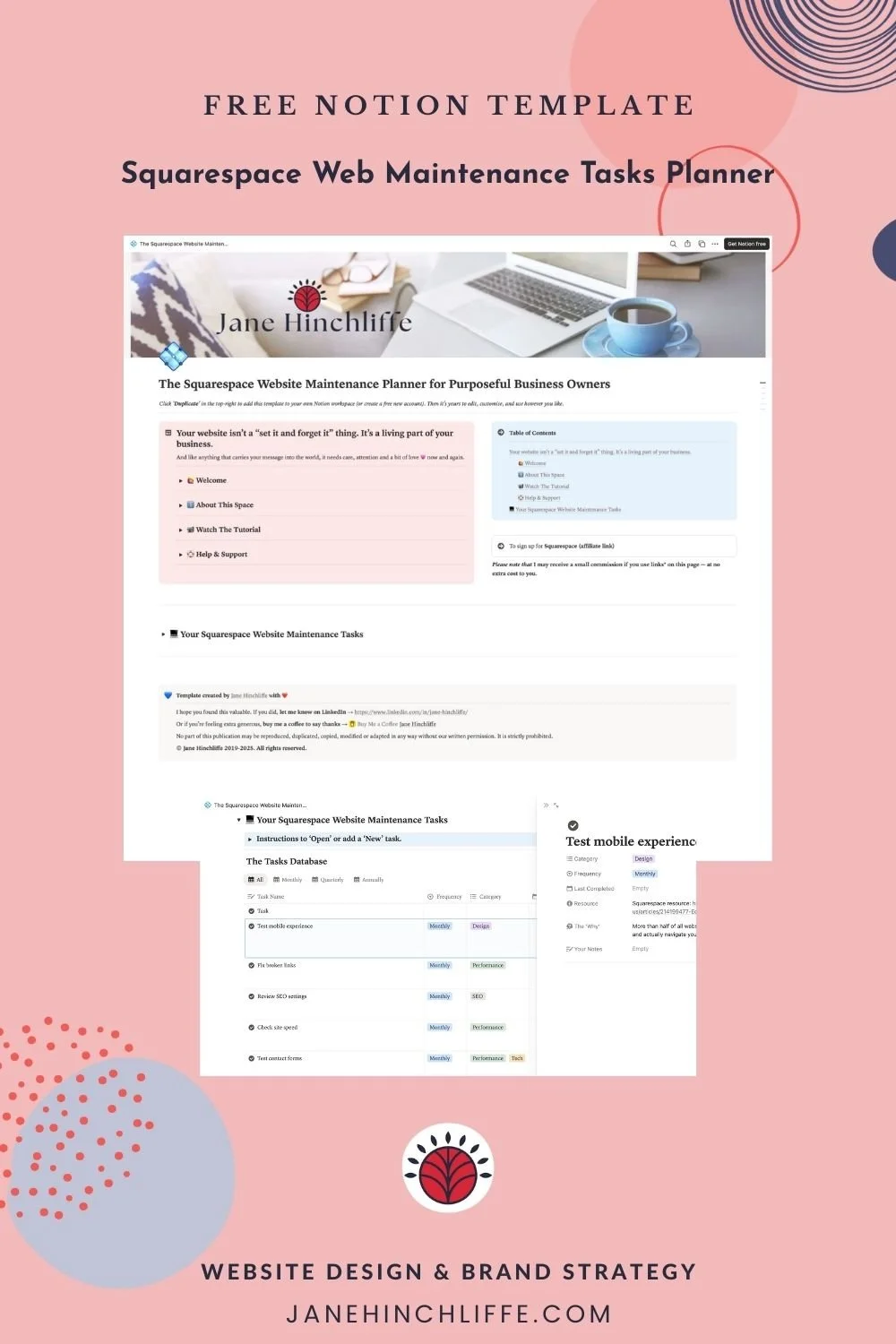
What's Inside Your Squarespace Website Maintenance Tracker:
✅ Monthly, Quarterly, Annual Checklist
✅ Walk-through video
✅ Notes Section
✅ Last Checked Dates
✅ Helpful Resources
What Is Squarespace Website Maintenance (And Why Does It Even Matter)?
First off, let's clarify the basics. Squarespace already handles the technical heavy-lifting—hosting, security, and platform updates happen automatically. Brilliant, right?
But here's what Squarespace doesn't do:
Keep your content fresh and aligned with your evolving business
Check that your forms are actually working (and not sending enquiries into the digital void)
Optimise images that are slowing down your site
Fix broken links that frustrate visitors and harm your SEO
Update your SEO settings as search algorithms change
Test your mobile experience regularly
Think of it like this: Squarespace maintains the engine of your website. You're responsible for maintaining everything else—the tyres, the steering, the sat nav. And when those bits go wobbly, your business can suffer.
Issues like slow load times, broken links, and outdated content pile up fast and quietly chip away at your site's performance—and according to research, website maintenance can vary considerably, depending on complexity and size of business. But what's the cost of not maintaining it?
The Hidden Cost of Website Neglect
Picture this: You're a busy yoga teacher with a thriving practice. A potential customer finds you on Google, clicks through to your site, and...
Your contact form doesn't work (you never knew)
Your "Book a Call" or “Book a Class” link is broken
Your About page still mentions classes you stopped offering in 2023
The site loads sooooo slowly on mobile that they give up
They've gone. And they're not coming back.
Approximately 13% of people will leave a website if it takes more than 2 seconds to load, and this number increases to 40% if the website takes over 3 seconds to load. That's nearly half your potential clients disappearing before they even see your brilliant work.
Here's what typically happens when websites go unmaintained:
Your SEO Rankings Drop
Search engines reward websites that are fresh, well-maintained, and up-to-date. SEO is an ongoing process that takes consistent work because search engines update their algorithms, user behaviour shifts, and competition never stops. When you're not regularly updating your site, Google notices—and your rankings suffer.
Your Forms Stop Working
Nothing's more frustrating than discovering (weeks later) that your contact form has been broken, and you've been missing enquiries. It happens more often than you'd think.
Your Site Becomes Outdated
That gorgeous site you launched two years ago? It's showing its age. Design trends evolve. Your business evolves. Your offerings change. If your website doesn't reflect that, you look out of touch.
Technical Gremlins Multiply
One broken link leads to another. An oversized image can slow down your whole site. A plugin integration stops working. Small issues snowball into big headaches.
What Web Maintenance Actually Involves
Right then, let's talk about what proper Squarespace website maintenance looks like. Whether you're doing it yourself, using my tracker, or hiring someone to handle it, here are the essential tasks:
Monthly Maintenance Checklist
1. Test Your Contact Forms
Submit a test message to make sure forms are working and emails are landing in your inbox. Check any booking links, opt-in forms, or scheduling integrations too.
2. Check Your Site Speed
Fast loading keeps visitors engaged, and images that are too large can drag down your entire site. Use tools like Google PageSpeed Insights to spot issues. Compress any recent images you've uploaded.
3. Review Your SEO Settings
SEO page descriptions tell Google exactly what each page is about. Make sure every page has a unique, keyword-rich description that accurately reflects your content.
Blog post: Can Google Search Console help your Squarespace website get seen?
4. Fix Broken Links
Broken links create frustration and signal to both Google and your visitors that your site is poorly maintained. Use a tool like Broken Link Checker or manually click through your newest content.
5. Test Mobile Experience
More than half of all website traffic comes from mobile phones. Grab your phone and actually navigate your site. Check buttons, forms, images, and navigation.
Quarterly Website Tasks
1. Update your blog or portfolio with recent work
2. Refresh homepage copy (your words) to reflect current offerings
3. Review analytics to see what's working (and what's not)
4. Check third-party integrations like email marketing tools or scheduling apps
5. Update any seasonal content or offers
Annual Website Strategy
1. Complete SEO audit to identify new opportunities
2. Refresh your brand photography if needed
3. Review and update service pages to match your current packages
4. Check legal pages (privacy policy, terms, etc.)
5. Consider design updates to keep things fresh
6. Copyright date is updated to the current year
The Real-World Impact of Regular Maintenance
Let me share a scenario I see all the time:
Julie (not her real name), a leadership coach, launched her beautiful Squarespace site in 2022. She was thrilled with it. Fast forward 18 months, and she's noticed her enquiries have dried up. She's posting on social media. She's networking. But her website? Crickets.
When we looked under the hood, here's what we found:
Her contact form had stopped sending emails (she'd changed providers and never reconnected it)
Her "Work With Me" page still listed a 6-month programme she no longer offered
Her blog hadn't been updated in over a year
Three external links were broken
Her homepage images were massive (3MB+ each!) and her site loaded in 8 seconds on mobile
The thing is, Julie's business had grown. She'd refined her offerings, raised her prices, and developed serious expertise. But her website told a completely different story—one of an outdated, potentially unreliable business.
We spent one VIP Maintenance Day together and transformed her site. Within three weeks, she had three discovery call bookings. Within 6 weeks, she'd signed two new clients. The site finally reflected her excellence.
Why "Set It and Forget It" Doesn't Work Anymore
Your business isn't static. Neither should your website be.
You're growing. Your services are evolving. Your expertise is deepening. Your ideal clients' needs are changing. The landscape of website management demands a proactive approach to maintenance that keeps pace with your business growth.
Plus, the digital world moves fast:
Google's algorithms update constantly
Design trends shift
User expectations rise
Mobile usage continues to dominate
If you're not maintaining your site, you're falling behind—even if you can't see it happening.
DIY vs Professional Squarespace Maintenance
So, I'm all for doing things yourself when it makes sense. But let's be honest: you started your business to coach or educate clients, create art, teach courses, or provide your brilliant services—not to become a website maintenance expert. Am I right?
When DIY Makes Sense:
You have the time and enjoy the technical side
Your site is relatively simple, with minimal updates needed
You're comfortable troubleshooting issues yourself
Your budget is tight, and time is plentiful
When Professional Help Makes Sense:
You're too busy running your actual business
You don't enjoy the techy stuff (or it makes you anxious)
You've been putting off updates for months
You want someone who knows Squarespace inside out
You value peace of mind over cost savings
Outsourcing maintenance enables biz owners to focus on core aspects of their business, enhancing productivity and revenue generation. That's not just marketing speak—it's maths. If you bill £100/hour and spend 5 hours wrestling with your website, that's £500 of your time. Could you have earned more by focusing on your zone of genius instead?
How My VIP Website Maintenance Day Works
I created my VIP Squarespace Website Maintenance Day specifically for established business owners like you who need expert help without the faff.
Here's what makes it different:
It's Focused
One day. One website. One expert (me!). No distractions, no dragging things out for weeks. We tackle your priority list efficiently.
It's Flexible
Whether you need content updates, design tweaks, functionality fixes, SEO optimisation, or technical troubleshooting—it's all on the table. You set the priorities.
It's Done Right
With many years of design experience and deep Squarespace knowledge, I spot issues you might miss and implement solutions that actually work.
You Stay in Control
You share your task list in advance. We may have a planning call. Then I crack on while you focus on your business. I keep you updated throughout the day, and you get a full summary of everything completed.

Popular requests include:
✔ Batching blog posts, products, or portfolio items
✔ Design refreshes and layout improvements
✔ Form setup and integration fixes
✔ SEO optimisation across pages
✔ Broken link repairs and URL mapping
✔ Technical problem-solving
✔ E-commerce setup and updates
✔ Third-party tool integrations
Investment: £698 (payment plans available)
Limited slots each month, so if this sounds like exactly what you need, let's have a chat.
Quick Wins You Can Implement Today
Not ready for a full maintenance session? Here are five things you can do right now to improve your site:
Get my Website Maintenance Tracker template.
Test your contact form. Seriously. Do it now. Submit a test enquiry and make sure it arrives.
Check your site on your phone. Navigate through your key pages. Do buttons work? Does text overlap? Is it fast?
Update your homepage intro. Make sure it reflects your current offerings and speaks to your ideal client right now.
Fix one broken thing. That outdated service package, the wonky mobile menu, the slow-loading image—pick one and fix it.
Review your SEO descriptions. Go to your top 3 pages and make sure the SEO description accurately describes what's on the page. Include relevant keywords naturally.
These small wins build momentum. But if you've got a list of 20+ items (or you just don't fancy doing them), that's exactly what my VIP Day is for.
The Bottom Line: Your Website Is a Business Asset
Your website isn't just digital wallpaper. It's a 24/7 salesperson, brand ambassador, and first impression rolled into one.
When it's well-maintained, it:
Attracts the right clients effortlessly
Builds trust and credibility
Converts visitors into enquiries
Reflects your current expertise and offerings
Works hard so you don't have to
When it's neglected, it:
Sends visitors away before they even contact you
Makes you look outdated or unprofessional
Misses out on search engine traffic
Frustrates both you and your potential clients
Becomes a source of stress rather than support
You've done the hard work of building a meaningful business. Let's make absolutely sure your website reflects that brilliance.
FAQs About Squarespace Website Maintenance
How often should I update my Squarespace website?
Ideally, check the basics monthly (forms, speed, mobile experience), do content updates quarterly, and complete a strategic review annually. The more active your business, the more frequent your updates should be.
Is Squarespace really maintenance-free?
Squarespace handles platform updates, hosting, and security automatically—which is brilliant. But you're still responsible for content updates, SEO optimisation, form testing, performance checks, and keeping everything aligned with your evolving business.
What's the biggest mistake people make with website maintenance?
Waiting until something breaks. Proactive maintenance prevents problems. Reactive maintenance is expensive, stressful, and often means you've already lost potential clients.
How much should I budget for website maintenance?
It depends on your needs. DIY is free but costs your time. My VIP Maintenance Day is £698 for up to 8 hours of focused work. Monthly retainers typically range from £150-£500+ depending on complexity and frequency.
Can't I just update everything myself?
Absolutely—if you have the time, knowledge, and inclination! But most business owners find that outsourcing saves time, reduces stress, and delivers better results. Your zone of genius probably isn't website maintenance, and that's completely fine.
What happens if I don't maintain my website?
Your SEO rankings drop. Your site gets slower. Broken elements frustrate visitors. Outdated content makes you look unprofessional. And worst of all, you lose potential clients who never even tell you there was a problem—they simply leave.
How do I know if my website needs professional help?
If you've been putting off updates for months, if you're not confident making changes yourself, if you've noticed a drop in enquiries, or if the thought of logging into your site makes you anxious—it's time to bring in help.
Takeaway:
Your Squarespace website needs regular maintenance—not because it's broken, but because your business is growing.
Truthfully, maintaining your website isn't about perfection. It's about progress. It's about making sure your online presence keeps pace with your offline excellence.
Whether you choose to handle maintenance yourself or hand it over to someone who loves this stuff (hi! 👋), the important thing is that it gets done. Consistently. Strategically. With care.
Ready to give your website the attention it deserves?
If you have a list of updates gathering dust, broken links you keep meaning to fix, or content that's embarrassingly out of date, let's sort it out together. My VIP Website Maintenance Day could be exactly what you need.
Or, if you're looking for a quick Squarespace Help fix, try this. For ongoing strategy and a completely fresh start, check out my Squarespace Web Design packages or book a Website Audit with Strategy to identify exactly what your site needs next.
Your business has the power to transform lives. Let's make sure your website reflects that. 🌱
Thanks 🌟 for being here, and if you’d like more tips, tools, and tricks [without the overwhelm], to help YOU grow your small business, I’d love to have you join my twice-monthly HeartBiz 💌 Letter.
Subscribe here for my Free downloads:
1. 5-Step Web Design Checklist PDF
2. Uncover Your Unique Selling Proposition USP
3. Ideal Customer editable Canva Template
4. SEO Checklist for all platforms (including Squarespace)
5. Is Your Website Holding You Back? A brand identity checklist.
6. Small Business Web Maintenance Tracker (Notion Template)