If you liked this, Pin to Pinterest, or save for later.
You’ve probably heard about AI everywhere lately — chatbots, content generators… the list goes on.
But here’s the point: AI isn’t just a buzzword for tech enthusiasts. It helps to optimise your website for AI search.
It’s changing the way Google finds, ranks, and recommends websites to real people — including your ideal clients. In fact, I’m experiencing more and more lead referrals via ChatGPT (3 just in the last few weeks!).
So, I’d recommend optimising your website for AI search if you haven’t already, or you could be missing out on the very audience you most want to reach.
“53% of all website traffic now comes from organic search, and with AI increasingly shaping search results, optimising for AI isn’t optional — it’s essential.”
The good news? If you use Squarespace, you can design a site that’s both beautiful for humans and smart for AI. Here’s how.
1. Make your Squarespace Site Visible to Crawlers
To do this, go to Settings > Website > Crawlers and check the boxes that you see below.
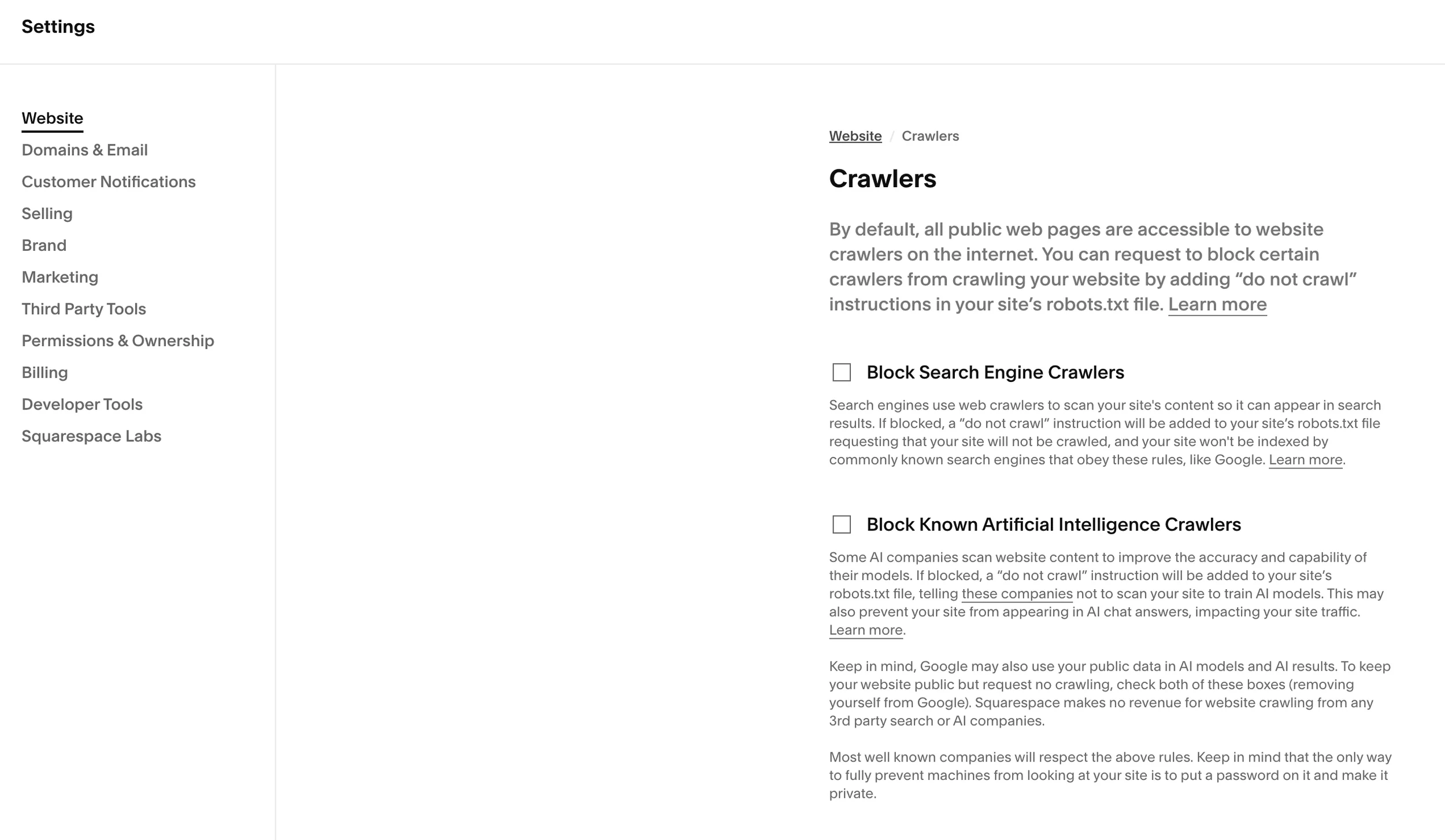
2. Make Your Content Clear and Structured
AI tools, including search engines, “read” websites differently than humans. They scan headings, lists, and structured content to understand what your site is about.
Tips for Squarespace:
Use clear H1, H2, and H3 headings to organise your pages.
Aim for clean URLs.
Include bulleted lists for key points — it helps both readers and AI scan your content.
Keep paragraphs short and purposeful.
“AI looks for structure and clarity. If your site is a jumble, it can’t help people find you.”
When you work with me, part of my Web Design Packages includes optimising headings, copy structure, and page layouts to ensure your site works for both humans and AI. I’d also recommend using SEOSpace* (affiliate link, but a tool that I use and genuinely rate).
3. Optimise Your Images
Squarespace makes it easy to showcase gorgeous visuals, but AI and Google need more than just pretty pictures. They need context.
Use descriptive file names (e.g.,
mindful-dietitian-consultation.jpg).Add alt text that explains what’s happening in the image, and include your brand name, where relevant.
Keep file sizes below 500 KB and ideally, below 250 KB. Large files slow your site down, which affects rankings.
In my SEO-ready web designs, I take care of image optimisation, so your website is fast, functional, and discoverable.
When I talk about optimising your site for AI and search, it can feel like a lot to keep track of. If you’re not sure where to begin, a professional website audit is a great first step. It’s like giving your site a health check — so you know exactly what’s working, what’s not, and where AI optimisation fits in.
4. Focus on Keywords That Match Intent

AI doesn’t just read words; it interprets intent. Your website needs to tell AI exactly who you help and how.
Think beyond “wedding photographer” or “yoga teacher.” Use longer phrases like “authentic wedding photography” or “cheerful North Yorkshire wedding photographer.”
Sprinkle these phrases naturally across headings, page copy (the words for your website), and image alt text.
If you haven’t done this before, don’t worry — it’s part of my 3-Day Quickstart and Custom Web Design packages. I help you uncover the right keywords and weave them seamlessly into your site content.
Of course, AI-friendly optimisation isn’t just about headings and keywords — your words need to sound like you. If you’d like some inspiration for writing web copy that connects with your audience (while still making Google and AI happy), take a look at my guide to authentic web copy.
5. Ensure Fast Loading Times
AI and Google favour websites that load quickly. Squarespace is generally fast, but there are things that can slow it down: heavy images, unnecessary code, and multiple embedded apps.
Quick fixes:
Use Image Compressor, TinyJPG, or better still, opt for a WEBP file via Picflow.
Limit third-party widgets and scripts.
When adding video, upload a thumbnail image.
I always include speed optimisation in my Squarespace Web Maintenance Service, so your site continues to perform at its best long after launch.
6. Make Your Site Mobile-Friendly
Over 60% of all web traffic comes from mobile devices. AI recognises mobile responsiveness as a major ranking factor. Squarespace makes this easy with responsive templates, but make sure you:
Check layouts before publishing.
Keep buttons large enough to tap.
Avoid tiny text that AI might misinterpret.
7. Keep Content Fresh and Valuable
AI loves sites that are updated regularly and provide real value. Even small updates — like adding a blog post, new service page, or FAQ — signal that your site is active.
I often advise clients to plan quarterly content updates. For those who want support, my 90-min Web Strategy / Squarespace Help sessions can help you map out updates that improve both visibility and engagement.
AI search engines pay attention to how people interact with your website. That’s why smoothing out every click, button, and page journey matters. If you’d like more insight into creating a seamless user experience, I’ve shared some simple ways in this post on improving customer touchpoints.
Why AI Optimisation Matters
One of the myths about AI optimisation is that it makes websites feel robotic. In truth, it should highlight your uniqueness, not hide it. If you want to explore this further, I’ve shared five simple ways to show your brand personality on your website — a perfect companion to AI-friendly design.
***
If you haven’t thought about AI yet, now is the time. Whether you’re creating your first website or redesigning an existing one, optimising your website for AI search improves:
Search engine visibility
Engagement with your ideal clients
The chance your content gets picked up by AI tools, like chat assistants or AI-powered directories
A well-structured, AI-ready website doesn’t just look good — it works harder for your business.
🌟 Ready to Optimise Your Website for AI Search?
Whether you’re just getting started or need a full redesign, my Squarespace Web Design Packages are designed to create beautiful, functional, and AI-friendly websites that attract your dream clients. From initial brand strategy calls to full SEO optimisation, I’ll guide you every step of the way.
Let’s create a website that isn’t just a pretty face online — one that works smart, performs fast, and helps your business grow.
Thanks 🌟 for being here, and if you’d like more tips, tools, and tricks [without the overwhelm], to help YOU grow your small business, I’d love to have you join my twice-monthly HeartBiz 💌 Letter.
Subscribe here for my Free downloads:
1. 5-Step Web Design Checklist PDF
2. Uncover Your Unique Selling Proposition USP
3. Ideal Customer editable Canva Template
4. SEO Checklist for all platforms (including Squarespace)
5. Is Your Website Holding You Back? A brand identity checklist.